Export or screenshot the current services list inside ESO (and save any organizational standard list).
Record a fixed workload you can repeat: e.g., cold boot-to-desktop time, compile job, game launch, or VM power-on.
Open Task Manager → Performance and note idle CPU, disk, and network baselines for 2–3 minutes.
Optional: in Process Hacker, bookmark noisy processes before service changes so results are easier to read afterward.
Validation after apply
Re-run the same workloads from your baseline protocol; change only one major variable at a time.
Confirm critical business features: printing, VPN, Bluetooth peripherals, remote administration, and update channels.
If CPU is still high, switch to process-level tools: Process Explorer or Process Hacker for threads and stacks—not another aggressive service preset.
Measurement methodology
Use the same power profile (plugged vs battery) between measurements.
Pause other heavy updaters for a bit; note Windows Update if it is running during your test.
Prefer median-of-three for boot and launch metrics; discard outliers caused by background updates.
Defender, SmartScreen, and antivirus warnings
Unsigned or uncommon portable tools often get flagged. Confirm the download URL, compare hashes if published, check who published the build, and follow your company policy. If you are unsure, inspect the file in an isolated VM before you allow it everywhere.
Aggressive service profiles may disable convenience features on machines that still need them. If a user suddenly cannot print, revisit print spooler dependencies. If Bluetooth accessories fail, revisit Bluetooth support services. ESO list edits are reversible—treat surprises as feedback, not emergencies—unless SLAs are burning, in which case execute your rollback plan immediately.
Reset and recovery
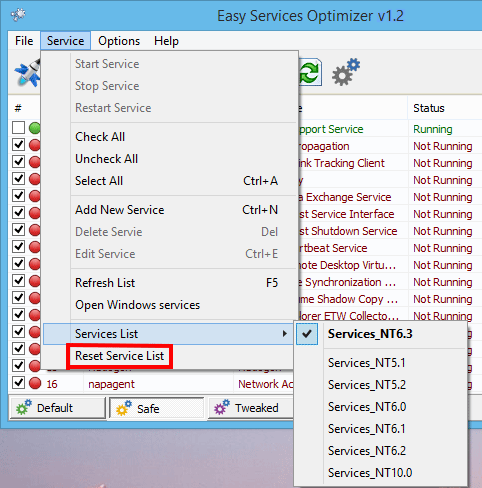
Use in-app reset flows (for example “Reset Service List”) to return to curated defaults when available.
Restore from exported lists or registry artifacts you saved before changes.
Escalate to broader Windows recovery only if you cannot restore service start types—document the delta that caused the outage.